Blue Modern Gradient IT Solutions & Technology Presentation
ABOUT ME
Hello! My name is Mikołaj Rutkowski
I specialize in creating interactive presentations
I am also a participant in an international Erasmus project, which gives me the opportunity to work with people from different cultures and gain valuable professional experience. As part of this project, I develop my skills and broaden my knowledge in the field of technology, design and innovation.
Vr schools
„VR School” works by using VR glasses to create immersive learning experiences where students can immerse themselves in virtual worlds, interactive scenarios and realistic simulations, which facilitates learning and strengthens understanding of the material.
How does it work in practice?
Immersion and interaction:
Students put on VR glasses that display a virtual world, creating the impression of being present in another place or situation. Interaction with this world is carried out using body movements, controllers or other devices, which allows for practical experiences and experiments.
Software and content:
For virtual reality, software is needed that generates a virtual world and educational content, such as interactive lessons, simulations, educational games and 3D materials.
Applications in education:
VR can be used to teach various subjects, such as geography (virtual journeys), history (visit to ancient Rome), biology (studying cells) or chemistry (simulation of chemical reactions).
Example:
The ClassVR platform offers ready-made VR and AR educational content, tailored to the curriculum, and also provides teachers with tools to create their own interactive lessons.
Advantages:
VR can increase student engagement, facilitate understanding of difficult concepts, develop social skills and creativityIn Poland and around the world, many universities, including the University of Business and Health Sciences in Lodz, the University of Wroclaw, as well as world universities such as Harvard and Stanford, use VR technology in education, offering simulators and virtual learning environments.
Universities in Poland using VR:
The University of Business and Health Sciences in Lodz:
Offers law and criminology students a virtual forensic procedure simulator and access to a VR courtroom.
The University of Wroclaw:
Has a „Virtual Crime Room”, created in cooperation with Asseco, which is one of the most advanced simulators of this type in the world.
Universities around the world using VR:
Harvard and Stanford: They use VR simulators.Applications of VR in education:
Simulators:VR allows you to create simulators of various processes and situations, such as in medicine, law, or criminology.
Virtual environments:
VR allows students to explore virtual worlds, such as historical sites, laboratories, or exotic locations.
Interactive learning:
VR allows for more interactive and engaging forms of teaching.
Skill development:
VR can be used to train various skills, such as operating equipment, interacting with customers, or dealing with difficult situations
IT plays a huge role in our daily lives, both for leisure and work. Here are some examples:
Relaxation:
Entertainment: IT provides us with access to a wide range of entertainment, such as movies, music, video games, and social media. We can watch movies and series on streaming platforms, listen to music on music services, play games on computers and consoles, and communicate and share content with friends and family through social media.
Communication: IT helps us communicate with other people, regardless of distance. We can talk to our loved ones using instant messengers, call them on the phone, and send them emails and text messages.
Relaxation: IT can help us relax and unwind. We can listen to relaxing music, watch movies and series, read e-books, and meditate with the help of mobile applications.
Work:
Productivity: IT increases our productivity at work. We can use computer programs to write documents, create presentations, analyze data, and manage projects. We can also use the internet to search for information, communicate with others, and collaborate with our team.
Communication: IT helps us communicate with other employees. We can send and receive emails, call each other on the phone, and use instant messaging and video conferencing platforms.
Access to information: IT gives us access to a huge amount of information. We can search for information on the internet, use databases and digital libraries, and learn new things through online courses and educational materials.
Automation: IT allows us to automate many tasks, which saves us time and effort. We can use computer programs to automatically generate reports, send emails, and manage social media.
To sum up, IT is an integral part of our daily lives and helps us both in rest and work. IT allows us to have fun, communicate with others, relax, increase productivity, access information, and automate tasks.
What is Python ?:
Python is a popular, high-level, general-purpose programming language. It is known for its readability and concise code, which makes it easy to learn and use. Python is an interpreted language, which means that the code does not need to be compiled before it can be run.
Key Features of Python:
Clear and concise syntax: Python has a syntax that resembles English, making it easy to understand and write code.
Cross-platform: Python code can be run on a variety of operating systems, such as Windows, macOS, and Linux.
Huge standard library: Python has a rich standard library that includes many useful modules for various tasks, such as file handling, networking, databases, and graphics.
Support for different programming paradigms: Python supports object-oriented, imperative, and functional programming.
Dynamic typing: Python does not require you to declare the type of a variable before using it.
Automatic memory management: Python automatically frees memory that is no longer in use.
Uses of Python:
Python is used in a wide variety of fields, including:
Web development: Python is often used to build the backend of websites, as well as to create web applications using frameworks like Django and Flask.
Data analysis and data science: Python is a popular language in the field of data analysis and data science, thanks to libraries like NumPy, Pandas, and Matplotlib.
Artificial intelligence and machine learning: Python is also widely used in the field of artificial intelligence and machine learning, thanks to libraries like TensorFlow and PyTorch.
Automation: Python can be used to automate various tasks, such as file processing, sending emails, and managing systems.
Game development: Python can be used to create games using libraries like Pygame.
Internet of Things (IoT): Python is used in IoT-related projects to collect, analyze, and process data from IoT devices.
Python is a versatile and powerful programming language that is easy to learn and use. Its popularity is constantly growing and its applications are becoming wider.
SMART SCHOOL:
The UK’s first teacher-free classroom – London 2024
David Game College, a private school in central London, launched the UK’s first teacher-free classroom in September 2024. Students there learn using artificial intelligence (AI) and virtual reality (VR) headsets. The class is part of a pilot programme and involves 20 students preparing for their GCSE exams.
🔗 Source – Sky News
How does it work?
Students use AI systems that analyse their progress, identify their strengths and weaknesses, and then personalise the teaching material.
Topics that a student has mastered well are repeated at the end of the term, while those that are difficult are covered earlier.
There are no teachers in the traditional sense, but there are so-called ‘learning coaches’ – people who support students in using technology and develop soft skills such as presentation, debating and entrepreneurship.
🔗 Source – EdTech Innovation Hub
🔗 Source – Economic Times Education
Reactions and controversies
Proponents: AI allows for individual approach to students and can make teaching more effective.
Critics: Fears that the lack of teachers means a “soulless and bleak future for education”.
🔗 Source – Sky News
AI in other UK schools
Reigate Grammar School, voted the best private secondary school in the UK in 2025, has also introduced AI tutors to improve student outcomes.
The UK government has invested £4 million in developing AI tools to automate homework grading, which is expected to reduce the workload of teachers.
Education Secretary Bridget Phillipson has stressed that the aim of AI is to support teachers, not replace them.
🔗 Source – The Times
🔗 Source – The Guardian
🔗 Source – The Times (grading papers)
🎥 Video (YouTube)
📺 Watch the AI classroom in London
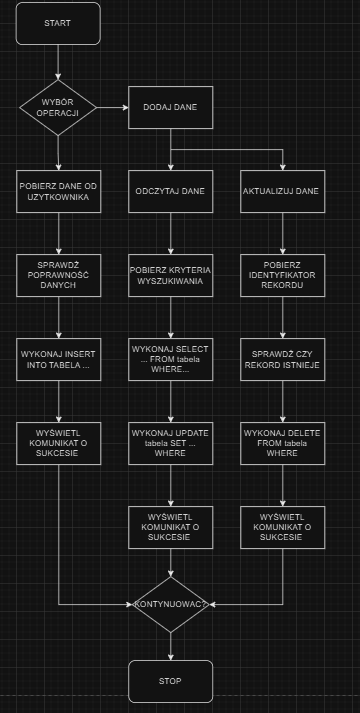
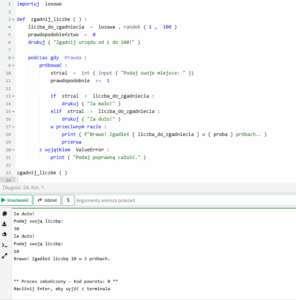
https://www.online-python.com/EHsibNSMXD
The Internet of Things (IoT) in industry, often referred to as Industry 4.0, is the use of intelligent devices and sensors to monitor, analyze, and optimize production processes. IoT enables remote machine control, predictive maintenance, and real-time data collection. These technologies increase efficiency, reduce costs, and minimize downtime. IoT is used in applications such as industrial automation, logistics, and energy management.
Industrial IoT encompasses a wide variety of tasks and roles, as the entire system combines information technology, electronics, automation, and data analysis. Here’s how it works and what work is involved:
How does IoT work in industry?
Sensors and devices – machines are equipped with sensors that collect data (e.g., temperature, vibration, humidity, energy consumption).
Data transmission – data from sensors is transmitted to central systems (cloud or local servers) via Wi-Fi, LTE, 5G, or wired networks. Data Analysis – Data is analyzed using IoT and AI systems, allowing for things like predicting failures, optimizing production, or quality control.
Response and Control – The system can automatically make a decision (e.g., shut down a machine, trigger an alarm) or delegate it to an operator.
Typical Jobs and Roles in Industrial IoT
IoT Engineer / Automation Engineer
Designs and integrates sensors with machines.
Programs PLCs and SCADA systems.
Data Analyst / Data Scientist
Analyzes sensor data to detect anomalies, optimize processes, and perform predictive maintenance.
IoT Security Engineer
Secures IoT networks and devices against cyberattacks.
Embedded Systems Developer
Develops software for devices (e.g., microcontrollers) operating in an industrial environment.
IoT Systems Administrator
Manages the IoT platform (e.g., AWS IoT, Azure IoT), overseeing connectivity, updates, and integrations.
IoT Maintenance Technician
Uses IoT data to make decisions about machine maintenance.
What is IoT in Medicine?
IoT in medicine is a network of connected medical devices, sensors, applications, and IT systems that collect, monitor, and transmit health data in real time. This enables remote patient monitoring, faster diagnosis, and more personalized and effective care.
How does it work?
Medical devices with sensors
Examples: blood pressure monitors, glucometers, pulse oximeters, ECG devices, and fitness trackers.
They collect data such as heart rate, glucose levels, oxygen saturation, and physical activity.
Connectivity and Data Transfer
Data is transmitted via Bluetooth, Wi-Fi, or cellular networks to a smartphone or directly to the cloud.
Platforms and Data Analysis
Systems analyze data and detect abnormalities (e.g., sudden increases in blood pressure, irregular heartbeat).
If necessary, the doctor or caregiver is automatically notified.
Response and Integration with Care
The doctor can remotely adjust treatment, call the patient for tests, or initiate medical intervention. IoT Applications in Medicine
Remote Patient Monitoring (RPM)
People with chronic illnesses (e.g., diabetes, heart disease) can be continuously monitored at home.
Telemedicine
Facilitates remote consultations with doctors along with real-time access to health data.
Equipment and Medication Management
Smart medication dispensers provide dose reminders, and hospitals can track the location of medical equipment.
Monitoring the Elderly
Devices detect falls, irregular breathing, and lack of movement – and send alerts to loved ones or medical services.
Smart Hospitals
IoT systems optimize device operation, control air conditioning, analyze energy consumption, and monitor patient conditions.
IoT-Related Work in Medicine
IoT Engineer / Biomedical Engineer – creates and implements medical devices.
Health Data Specialist – analyzes data from IoT devices. Data Security Expert – Protects medical data in compliance with regulations (e.g., GDPR, HIPAA).
Health App Developer – Creates health monitoring apps.
IoT Medical Equipment Service Technician – Maintains and calibrates devices.
🏙️
What is IoT in a smart city?
It is a system of interconnected sensors, cameras, devices, and software that collect data from urban spaces and help make better decisions in real time—regarding traffic, energy, safety, cleanliness, transportation, and more.
How does it work?
IoT sensors and devices (e.g., pollution meters, parking sensors, LED streetlights).
Data networks (e.g., 5G, LTE, LoRaWAN, Wi-Fi).
Management platforms (e.g., city data centers, cloud, AI for analysis).
Apps and interfaces for officials and residents (e.g., city mobile app).
Examples of IoT applications in a smart city
1. Smart traffic management
Sensors analyze traffic and adjust traffic lights in real time.
Example: Barcelona – a traffic control system reduces congestion and shortens commute times.
2. Smart parking
Sensors in parking spaces inform about available spaces via an app. Example: San Francisco – the SFpark app shows real-time parking availability and prices.
3. Waste Management
Dumpsters with fill level sensors send data to the garbage company, which optimizes collection routes.
Example: Paris – Bigbelly dumpsters compress waste and notify when it needs to be emptied.
4. Smart Lighting
Streetlights with motion sensors brighten when someone approaches and dim when the street is empty.
Example: Amsterdam – smart LED streetlights reduce energy consumption by 40%.
5. Air Quality Monitoring
Sensors located throughout the city measure pollution levels and help plan, for example, clean transportation zones.
Example: Warsaw – the Airly sensor network allows residents to track smog online.
6. Real-Time Public Transport
GPS on buses and trams allows for vehicle positioning and estimated arrival times. Example: Tallinn – public transport system with IoT and a route planning app.
7. Public Safety
Smart cameras (CCTV with AI) detect suspicious behavior, gatherings, and illegal parking.
Example: Dubai – „Smart Police” system with image analysis and real-time data.
IoT-related jobs and professions in Smart Cities
Urban IoT Engineer – designs a network of urban devices and sensors.
Data Analyst / AI Specialist – analyzes city data and creates predictive models.
IoT Security Specialist – protects city infrastructure from cyberattacks.
Smart City Manager / Consultant – implements smart city solutions and integrates them with the administration.
What are fractals?
Fractals are geometric objects characterized by self-similarity – this means that their structure appears similar at different levels of magnification. No matter how much we magnify a fragment of a fractal, its part will resemble the whole.
Main characteristics of fractals:
Self-similarity: the same form repeats at different scales.
Complexity: they have a complex structure, even if they are created according to simple rules.
Infinite detail: they can be divided into smaller and smaller fragments that still contain similar patterns.
Fractional dimension (fractal): fractals do not have an integral dimension (e.g., 1D, 2D), but can have an intermediate dimension, such as 1.58.
Examples of famous fractals:
The Mandelbrot set – one of the most famous fractals, computer-generated.
The Sierpinski triangle – a figure created by repeatedly removing triangles from a larger triangle. The Koch Curve – a line that never ends, although it has a finite length.
Barnsley Fern – a fractal that resembles a plant, demonstrating the use of fractals in modeling nature.
Applications of fractals:
Computer graphics – for creating realistic landscapes, clouds, and trees.
Nature – fractals describe the shapes of trees, snowflakes, and coastlines.
Medicine – in the analysis of biological structures, such as blood vessels.
Economics and physics – in the analysis of complex, irregular phenomena.
Python operators are special characters or keywords used to perform operations on data. These can be arithmetic, logical, comparison, or assignment operations. Operators allow you to manipulate data within a program, such as mathematical calculations, comparing values, or performing logical tests.
Types of operators:
Arithmetic operators:
are used to perform mathematical calculations such as addition, subtraction, multiplication, division, modulus, and exponentiation.
Comparison operators:
are used to compare values and return a logical result (true/false), e.g., equality (==), inequality (!=), greater than (>), less than (<).
Logical operators:
are used to combine logical expressions, e.g., AND (and), OR (or), NOT (not).
Assignment operators:
are used to assign values to variables, e.g., =, +=, -=
———————————————————————————————————————————-
Bitdefender